
Refinancing
List of Documents Required
From HDB portal (www.hdb.gov.sg)
Housing Loan and Financial Information
(If you do not own any HDB flat, take a printscreen of the message that you do not own any HDB flat instead)
From IRAS portal (www.iras.gov.sg)
From CPF portal (www.cpf.gov.sg)
NRIC front and back (Passport for Foreigners)
Latest 3 months' payslips
Current housing loan statement
(can be screen shot from ibanking showing latest outstanding balance, name and date)
Tenancy agreement with Certificate of Stamp Duty (if property is tenanted)
Steps to downloading required documents from HDB, IRAS, CPF
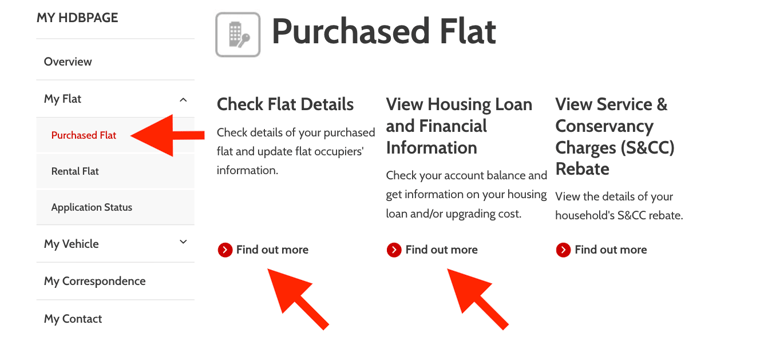
Latest HDB Flat Information & Financial Information
Login to www.hdb.gov.sg (MyHDBPage)
Click 'My flat'
Click 'Purchased flat'
Click ‘Flat Details’ and save PDF
Click ‘View Housing Loan and Financial Information’ and save PDF
If you own a HDB flat, provide both HDB Flat Information & HDB Financial Information.
If you do not own any HDB flat, take a printscreen of the message that you do not own any HDB flat instead.
HDB
Latest CPF transaction history
Login to www.cpf.gov.sg
Under ‘my CPF’, select ‘Transaction History’
Leave at default 15 months based on calendar and press ‘Search’
Click ‘Filter’, select ‘Employment and platform contributions’ and click ‘Apply’
Click on the ‘PDF’ to save a copy
Latest CPF property withdrawal statement
Login to www.cpf.gov.sg
Under ‘My CPF’, select ‘Home Ownership’
Choose the property that you are viewing for withdrawal details
Scroll to the title ‘Principal amount and accrued interest’ and click on the ‘PDF’ icon to save a copy
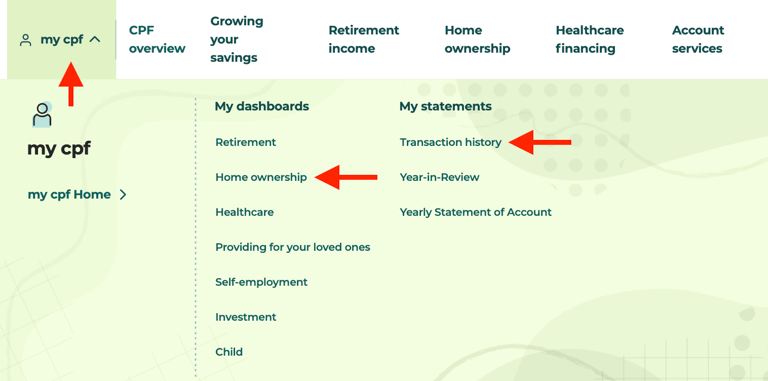
CPF


Latest IRAS Property Summary
Login to www.iras.gov.sg (Personal Tax)
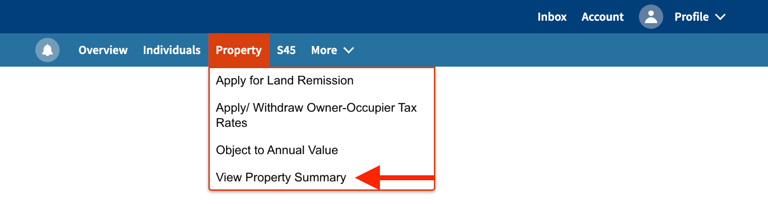
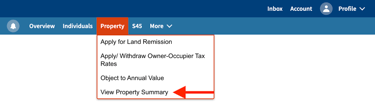
Roll mouse over to ‘Property’ on the third menu bar from top
Click on “View Property Summary”
Click on ‘Save As PDF/Print’ to save as PDF
Latest IRAS Notice of Assessment
Login to www.iras.gov.sg (Personal Tax)
Roll mouse over to ‘Inbox’ on the first menu bar from top and click ‘Individual’ under View Notices
Click on the latest 'Notice of assessment (individual)' and download PDF
IRAS
Get your personalised mortgage advice today!
Email: team@mortgagecrunch.sg
WhatsApp: +65 8400 1014
Mortgage Crunch Pte. Ltd.
UEN: 202545886E
© 2026. All rights reserved.